GetTaxHub Beginner's Guide 2026: Hiring a CPA Online for the First Time

Maybe this is the year the tax app finally asked a question you couldn't answer. A first 1099 from a side gig. A rental you inherited. An LLC you formed in March and haven't thought about since. Whatever it was, you've decided you want a real accountant this time, and you've never hired one.
Good news: working with a CPA online is less mysterious than it sounds. King Review walked through GetTaxHub's site on October 20, 2026, from its free calculators and blog to its pricing, FAQ and how-it-works pages, and turned it into a beginner's path from "I've never done this" to a filed return.
Important: this is a guide to using a service, not tax, legal or financial advice. Nobody can promise you a particular refund or tax bill. Talk to a qualified professional about your own situation.
First, What You're Actually Hiring
GetTaxHub (it brands itself as Taxhub) isn't software you click through alone. It's a virtual tax preparation service: a CPA reviews your documents, talks with you by phone or video, prepares the return and e-files it after you approve it. The brand says you work with the same CPA year after year, and its About page describes year-round access for questions.
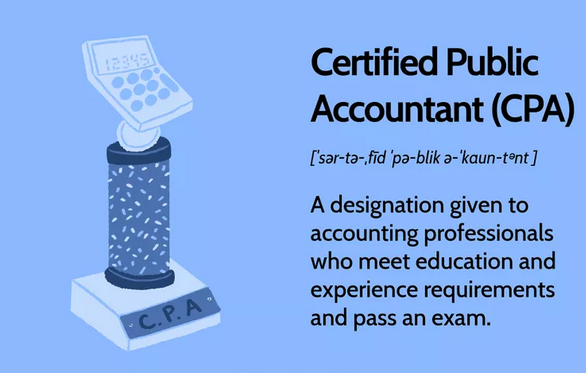
One of the site's own graphics explains the title: a CPA is a designation given to accounting professionals who meet education and experience requirements and pass an exam.
Step 1: Get a Rough Picture With the Free Calculator
Before you talk to anyone, GetTaxHub's Federal Income Tax Calculator is a no-cost way to see the shape of your year. It lets you pick the 2025 filing year (returns filed in 2026) or 2026 (returns filed in 2027), choose a filing status and state, then work through tabs for job and business income, other income, deductions, and adjustments and credits. The brand says it covers S-Corp and Schedule C tax, net investment income tax, capital gains, the QBI deduction and state income tax. There's also a Business Tax Calculator and an S-Corp calculator.
Treat the number as a starting point for questions, not a final answer.
Step 2: Book the Free 5-Minute Call
This is the single most useful beginner move. The services page offers a free 5-minute call to work out which forms you need and give you a fixed price, and it says there's no pressure to sign up afterwards. For a first-timer, that call answers the question you might not know how to ask: "Which of your services am I?"
Bring a simple list: every source of income (paychecks, 1099s, rent, brokerage accounts, K-1s) and whether you own a business entity.
Book Your First GetTaxHub Call →
Step 3: Choose Your Starting Service
Most beginners land in one of four places. Prices are those listed on gettaxhub.com on October 20, 2026; tax prep figures are the brand's averages, and the FAQ says your estimate can be adjusted once a CPA reviews your situation, with the final fee agreed before the return is prepared.
- "I just have questions." A 20-minute CPA consultation is $49, aimed at quick clarifications and quarterly estimated-payment calculations. The 40-minute ($89) and 60-minute ($129) calls go deeper.
- "I have a job plus something extra." Personal tax prep averages $325 and covers W-2 employees, landlords, passive investors with K-1s and day traders.
- "I'm a freelancer." Self-employed prep averages $380 for Schedule C, 1099 and single-member LLC filers.
- "My receipts are a mess." The Simple bookkeeping plan is $99 a month for Schedule C filers, and the page says you pay only after the first month.

Beginner-Friendly GetTaxHub Services
Four entry points, with the prices listed in October 2026. Tax prep prices are averages, not quotes.
Prices change often; the brand's site always shows the current price.
Step 4: Send Your Documents the Easy Way
Once you've created an account, the FAQ lists three ways to get paperwork to your CPA: upload files from the "upload documents" link in your dashboard, email them through the company's mail server, or, if you only have paper copies, photograph them with your phone using the "text your files" link. Beginners tend to wait until everything is perfect. Don't: send what you have, and your CPA will ask for the rest.
Step 5: The Call, the Draft and the Signature
You schedule a phone or video call, the CPA asks about your year, and the FAQ says your return will be ready for signature within 48 hours of the last piece of information arriving. You review it, then sign through an Experian-powered identity check, according to the About page. Payment comes after you approve the return, by Visa, Mastercard or PayPal, or from your refund if you qualify, which adds a $15 bank fee.
Step 6: After It's Filed
- Getting a refund? The FAQ says direct deposit is the preferred method and refunds can arrive in as little as 5 days, depending on IRS lead times. A mailed check takes much longer.
- Owe money? You can pay by electronic funds transfer from your bank account, or GetTaxHub emails you the payment vouchers to print and mail.
- Need a copy later? Request it in the message chain in your account, or call 1-844-TAX-PORT.

See GetTaxHub's Current Offer →
Keep Learning Between Calls
GetTaxHub's blog is sorted into four categories (Can I Deduct?, Landlords & Rental Properties, Self Employed & 1099 Contractors, and Taxes), and its newest posts, dated September 25, 2026, focus on LLCs: how members are taxed, the four ways an LLC can be taxed, and organizing small-business finances. They're useful background reading before a planning call.
Beginner FAQ
Do I need to know which forms I need before I sign up?
No. That's what the free 5-minute call is for, according to the services page.
Is there a public promo code?
We didn't find one on the site. See today's GetTaxHub codes for anything new.
Can GetTaxHub file last year's return too?
Yes. The FAQ says you create an account and schedule an appointment.
Are there monthly or hidden fees on tax prep?
The FAQ says no monthly fees and no hidden state fees; the named extra is the $15 bank fee for paying from your refund.
The Bottom Line
Hiring a CPA for the first time comes down to a few small moves: rough out your year on the free calculator, take the free 5-minute call, pick the one service that matches your situation, send documents the easy way and review the draft before you pay. Then check the GetTaxHub deals page before you book.
How we wrote this: King Review researched GetTaxHub using its official website, calculators, blog, service and pricing pages and FAQ on October 20, 2026. We haven't personally used this service and we don't invent ratings or discount codes. This article is general information, not tax, legal or financial advice. We may earn a commission if you buy through our links, at no extra cost to you.